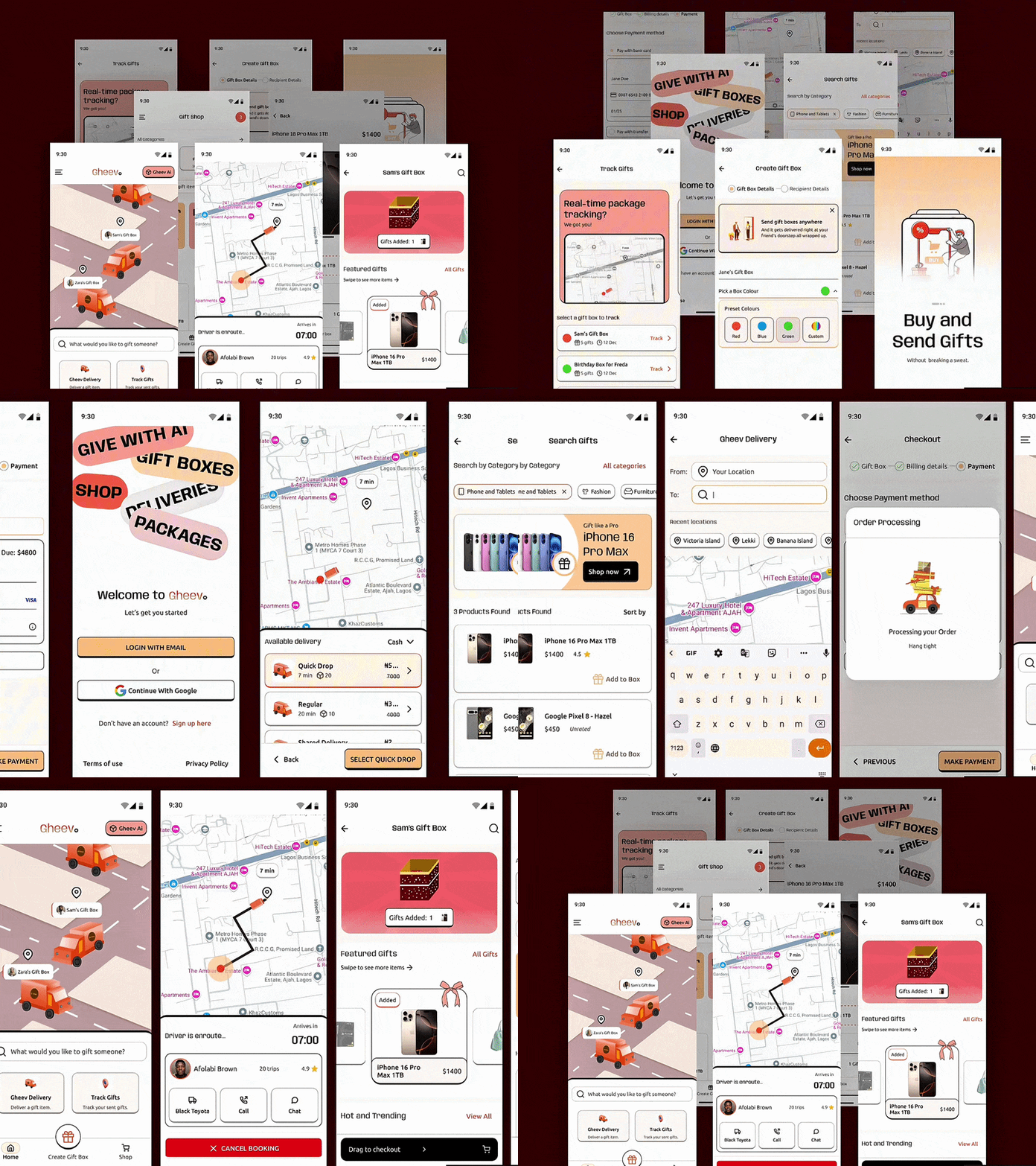
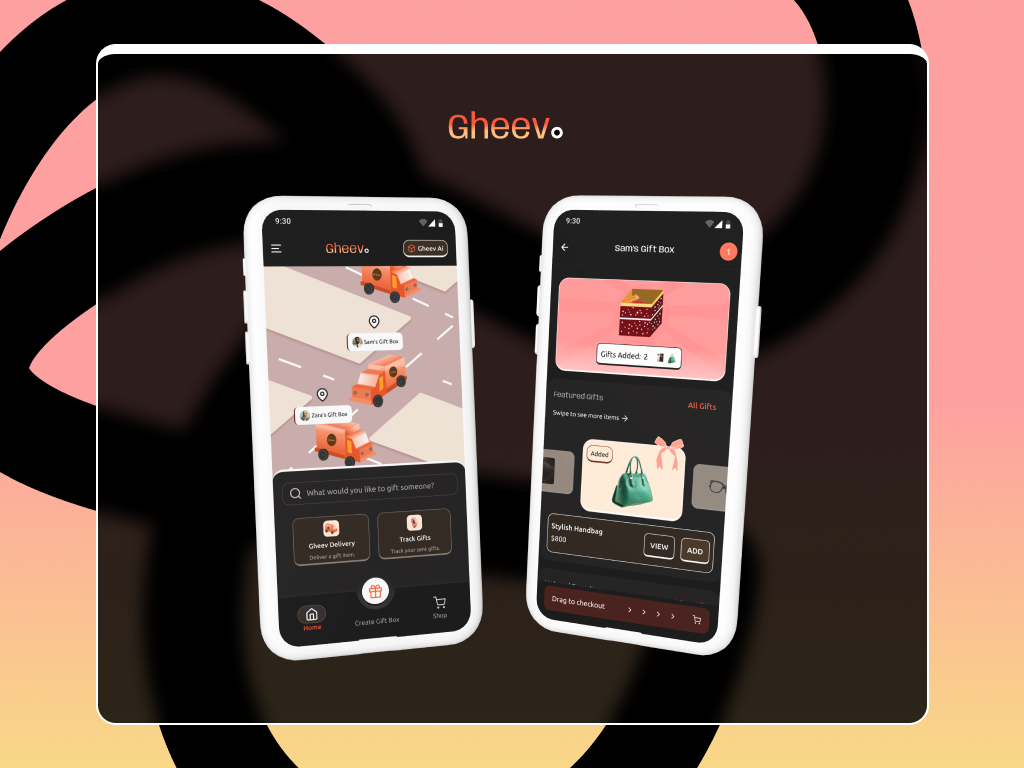
This e-commerce gifting app is a completely independent project born from a need to help people effortlessly create and customize beautifully packaged gift boxes, make easy payments, and track deliveries without feeling like they just ran a marathon.


UX Case Study
Gheev App UI Design
YEAR
2025
ROLE
UI Designer
UX Researcher
Motion Designer
SKILLS DELIVERED
UI Animation
Prototype Design
Interaction Design
Usability Testing
FIRST STEPS
Getting Started With Creating An Amazing Gifting Experience
Introduction
Picture this: it’s December 23rd, and the streets are packed and busy. Delivery slots are booked out, and Rita is sitting in front of her laptop, panicking.
She had the perfect gift in mind for her best friend, except, now it was too late to send it to her without the stress of handling logistics.
Rita’s story wasn’t strange. Similar experiences were shared by a number of people I spoke with; some of whom were parents trying to send surprise gifts, friends living in different countries, and even businesses managing lots of customer orders during the holidays.
Everyone wanted the same thing: an easier way to gift thoughtfully without the stress.
What started as a simple idea for an e-commerce app for gifting, quickly became a journey full of unexpected challenges, solving problems, and moments of both this is it and is this even worth it? Here’s a short detail of how it all came together.
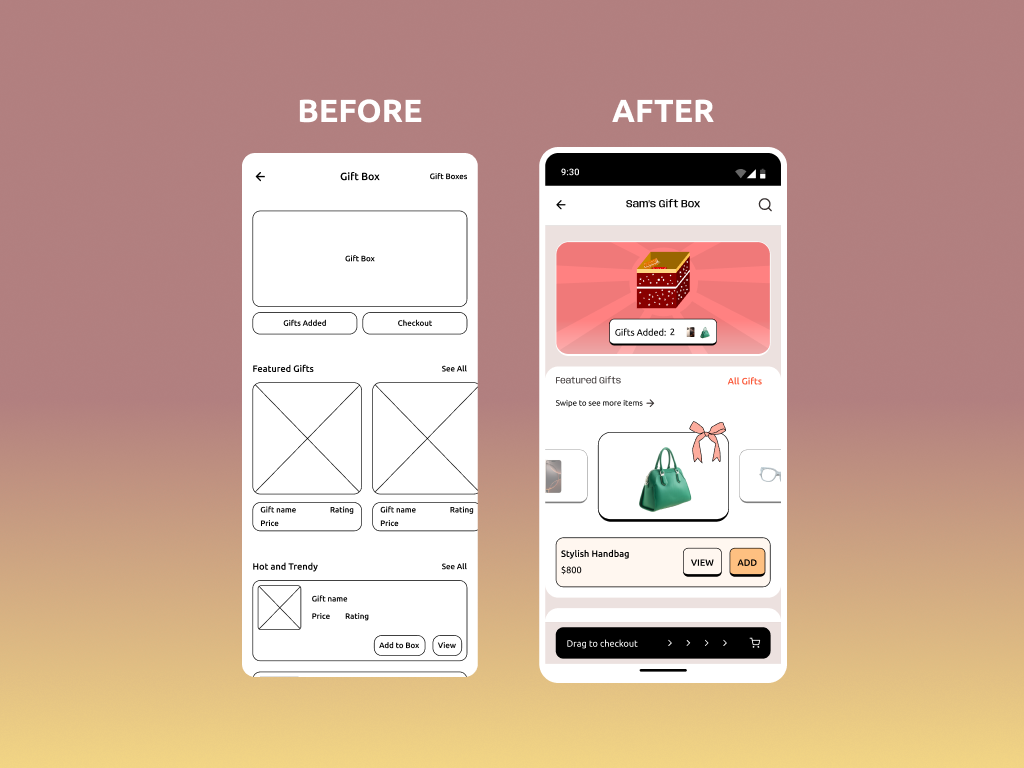
Before and after shot, showing how the user interface progressed from a simple wireframe to a polished mockup.
Research
The research didn’t begin with whiteboards or neat spreadsheets. It started in gift shops, market stalls, and chaotic delivery stations. I wanted to hear the real stories of real users.
One afternoon, I approached a woman at a supermarket. Let’s call her Tolu. She looked obviously tired and explained to me that she had just finished delivering some gift hampers to the loyal customers of her small business.
“I tried using a delivery app, but couldn’t track each driver all at once,” Tolu said, shaking her head. “So, I spent the entire afternoon playing delivery driver instead of doing other work-related stuff.”
Later that week, I also observed drivers and people dropping off their packages at a logistics station. It was pure chaos. Packages piled high, people queuing to send their packages, and a limited supply of delivery bikes.
One person looked at me and laughed “I just want to make my dad smile with this gift that I am sending to him, but I am getting this close to giving up and leaving this place.” she admitted.
And this was the aha! moment. Alongside the joy of making someone feel special through gifting, the process itself needed to be stress-free and, I dare say, rewarding.
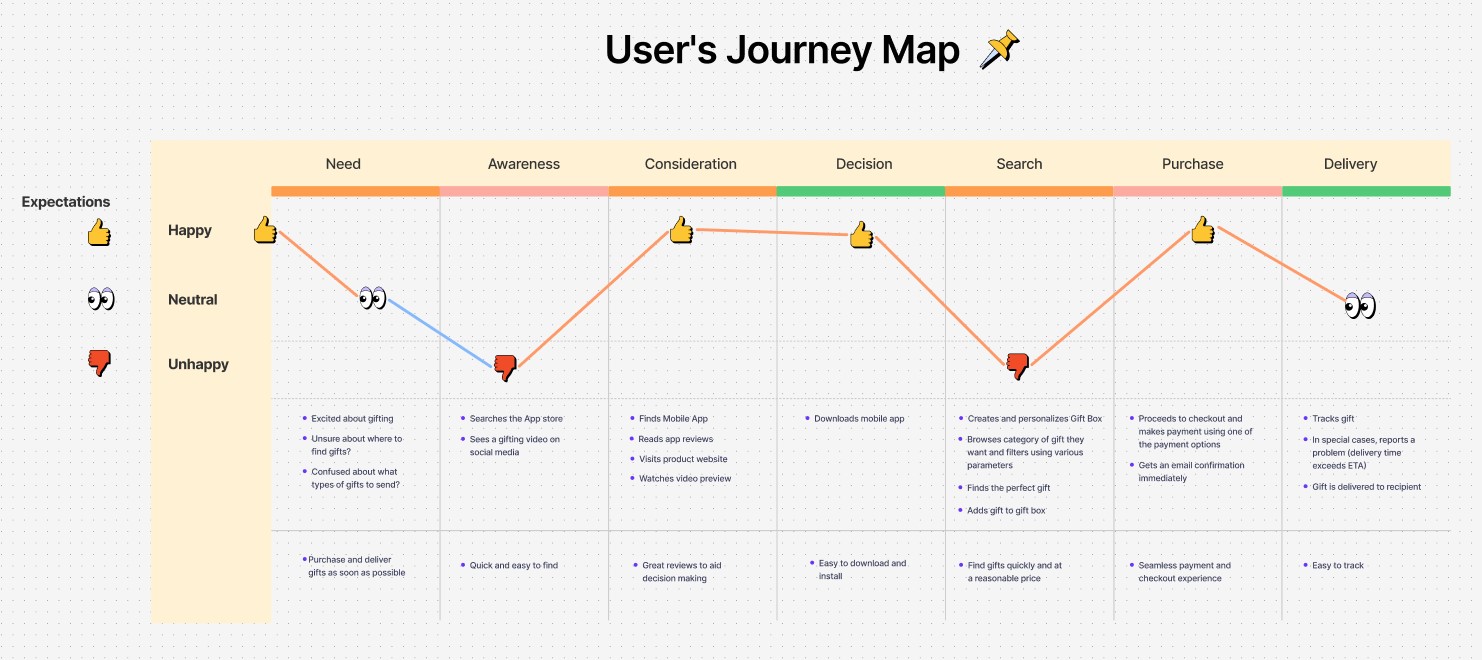
With this new insight, I mapped out the typical gifting journey of people who manually sent their packages through logistics companies. I also did the same for people who used an app to try to make the process easier: from the point of selecting items to pickup and delivery.
User Journey Map showing how users currently moved through stages during the gift purchase process. Finding an app where they could purchase the right gift was a major challenge and we set-out to solve this.
THE DESIGN PROCESS
Creating an Enjoyable Experience from Start to Finish
Phase 1: Making Gifting Feel Personal
I started by sketching out what gift customization could look like. The goal was to make users feel like they were creating something meaningful without getting choked by too many options.
Think of it as a digital version of walking through a store and picking out the perfect gifts for someone special.
The first challenge was balancing flexibility with simplicity. If users are presented with too many choices, they will get overwhelmed. Limiting their options too much on the other hand, will put them in a box of small choices.
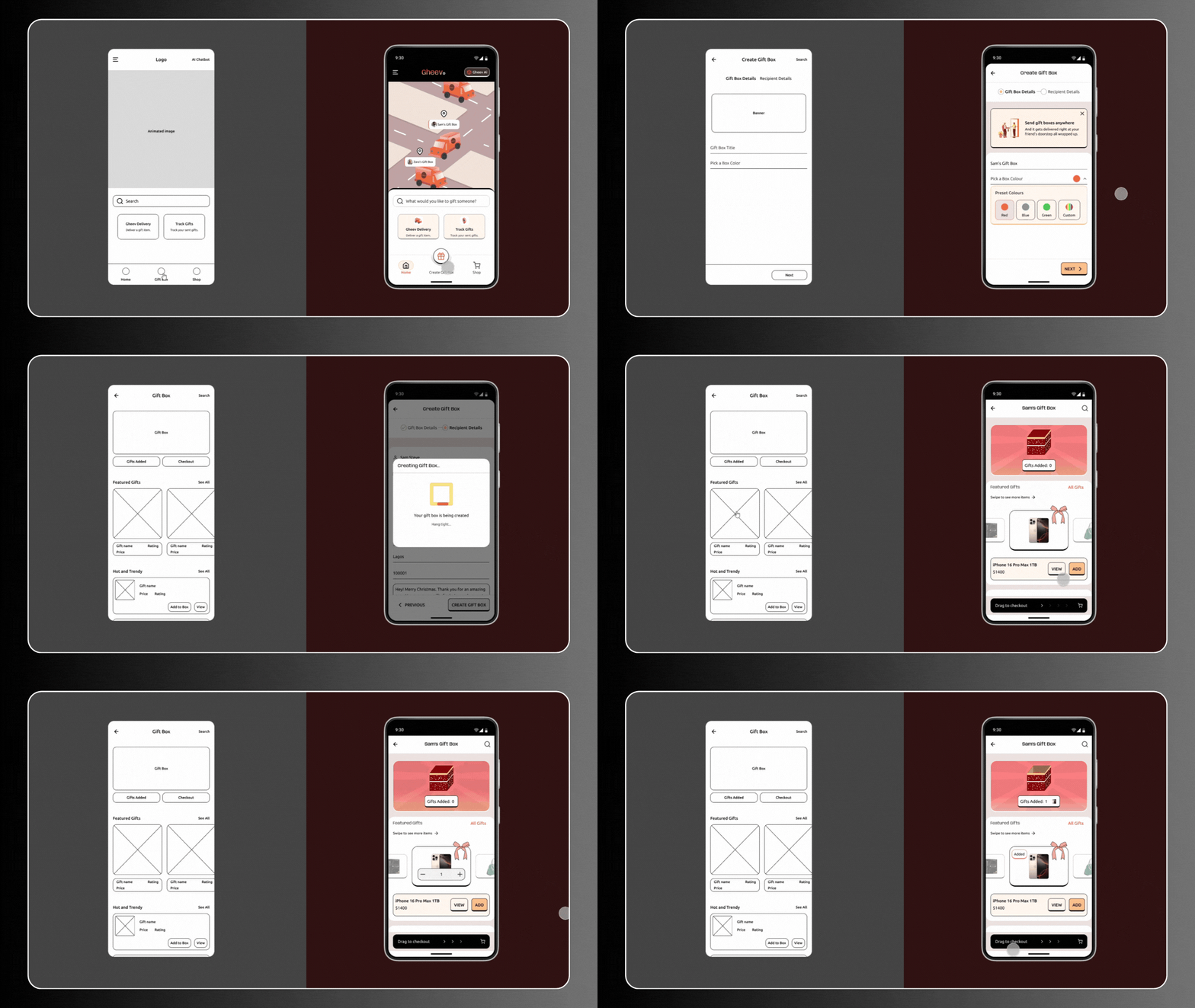
After some hours of brainstorming with some designer friends, we came up with the idea of a gift box builder. With this gift box builder, users could add items into their gift box on a single click, swap out products easily, and even see a real-time preview of their box.
Gift Box Builder showing Wireframe with simple layout and refined interactive Prototype
Phase 2: A Checkout Experience that Doesn’t Drop the Vibe
The next challenge was checkout. Most e-commerce platforms I noticed, make the process more complex than it should be. I wanted the experience to feel smooth, and enjoyable.
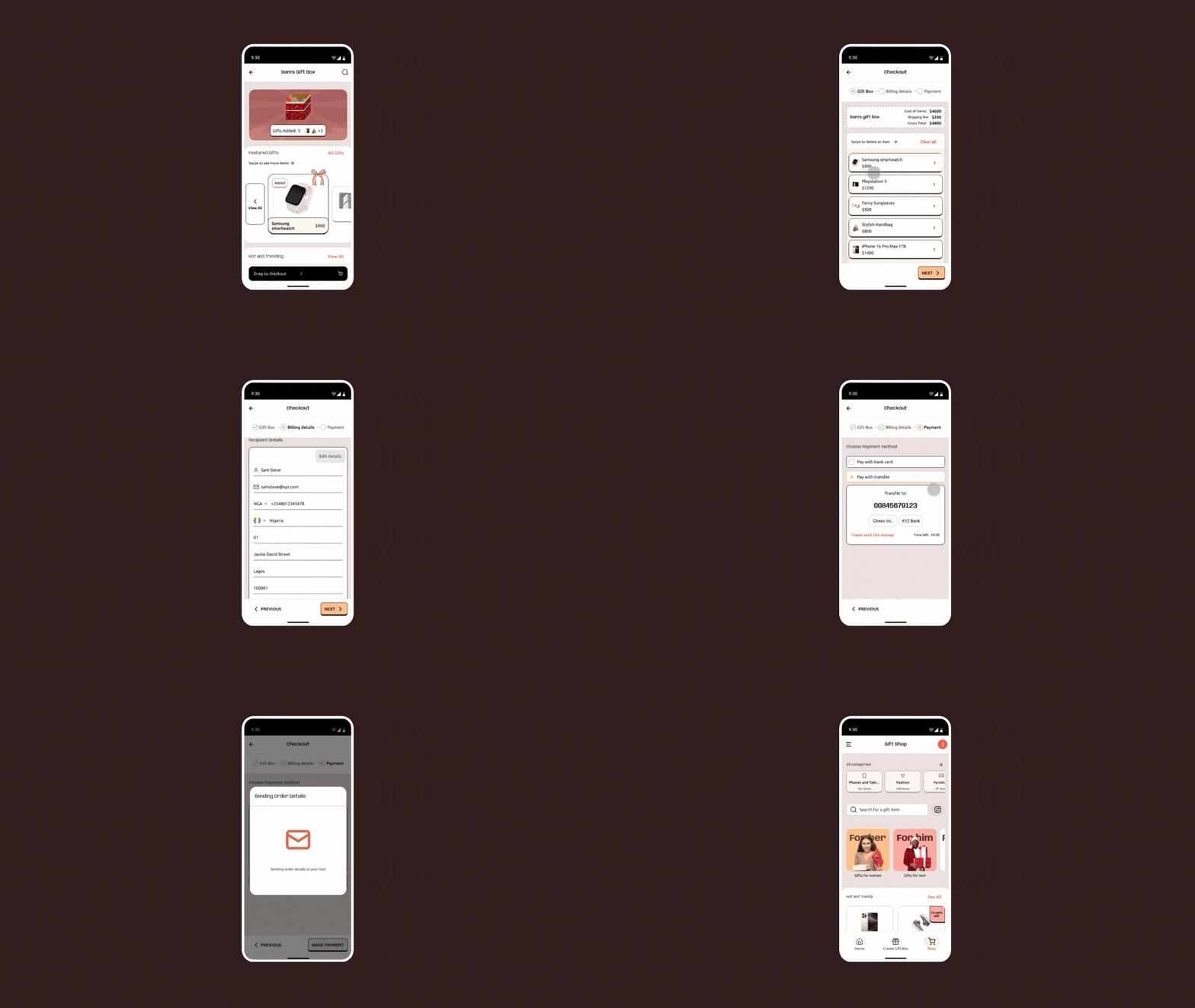
With this in mind, I split the process into three simple steps: Review, Payment, and Confirmation. The design was simple, with some playful micro-interactions at each step that made the user feel like they were making progress.
Animations on successful checkouts? Yes, please. One user during testing said that he didn’t even realize he was done until the confetti popped. Mission accomplished.
Interactive Prototype showing how a user moves from Gift box building to checkout in a simple, enjoyable flow.
Phase 3: Designing the Perfect Shop Page, Because Nobody Likes Endless Scrolling
At some point in the design process, we hit an unexpected roadblock. Many users loved the idea of customizable gift boxes, but they weren’t really sure about where to start.
During testing, we noticed a pattern. Users would open the app, excited to create a gift box, but then just…stare at the empty screen. One tester hesitated before saying, “I don’t even know what I’m looking for.”
That was the moment we realized that although we had designed a fair gift customization experience, but we hadn’t designed a great way to explore gifts. People needed a well-organized, easy-to-shop page that guided them toward the right gifts.
Matter-of-factly, the shop page had to do three things well:
1. Make gift discovery effortless.
2. Speed up decision-making.
3. Offer thoughtful suggestions.
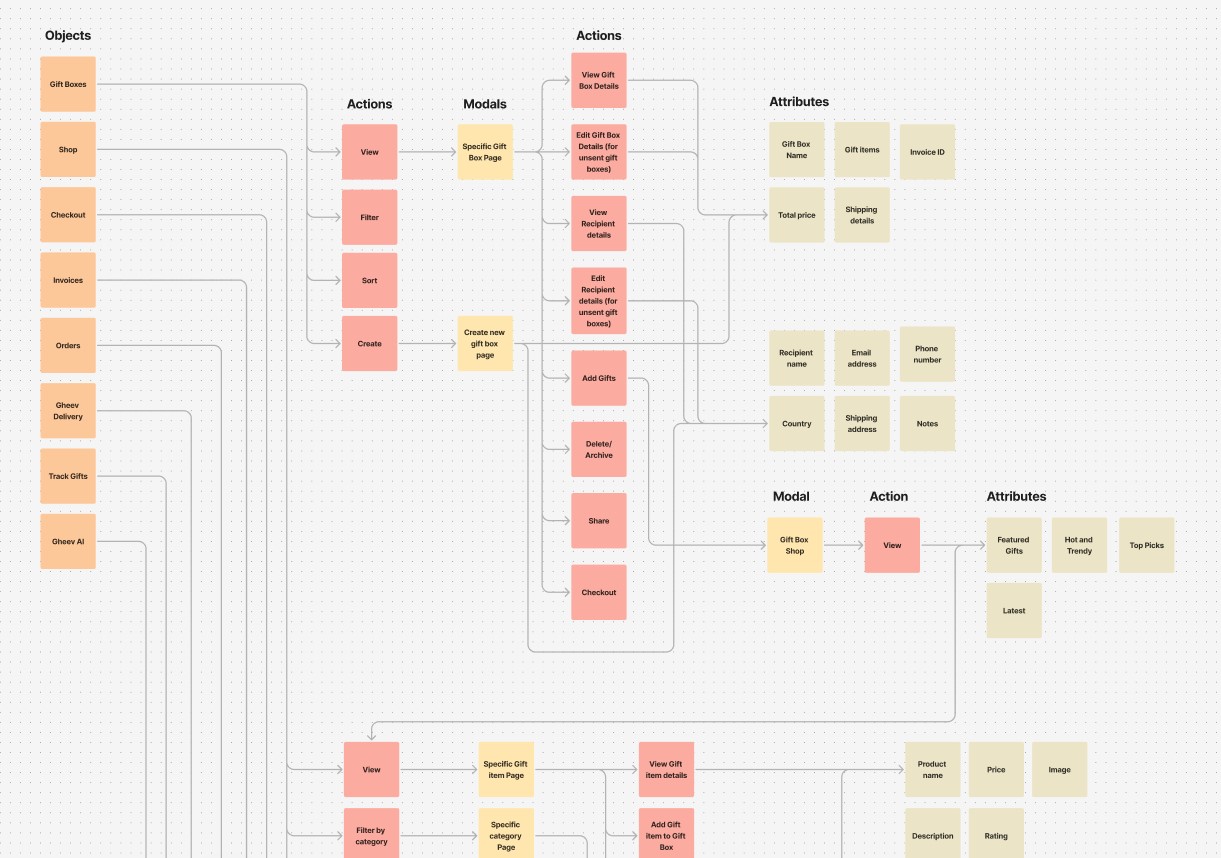
With these goals in mind, I and my team started mapping out the Gheev product information architecture and sketching the wireframes using FigJam.
Phase 4: From Wireframes to Wow…
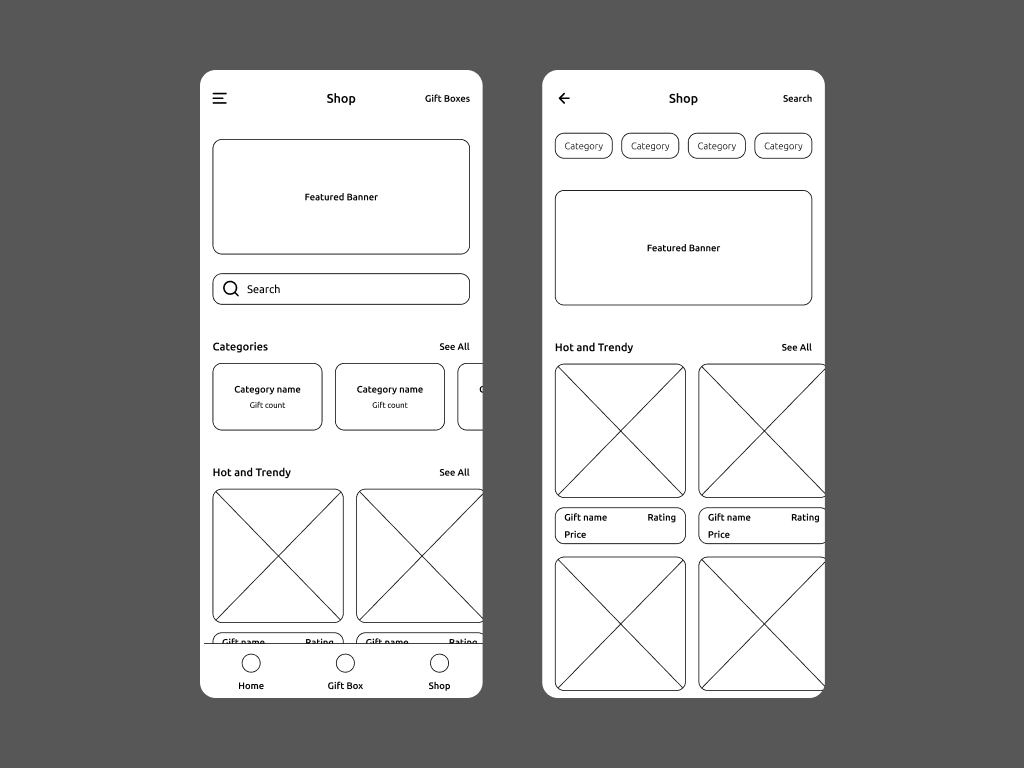
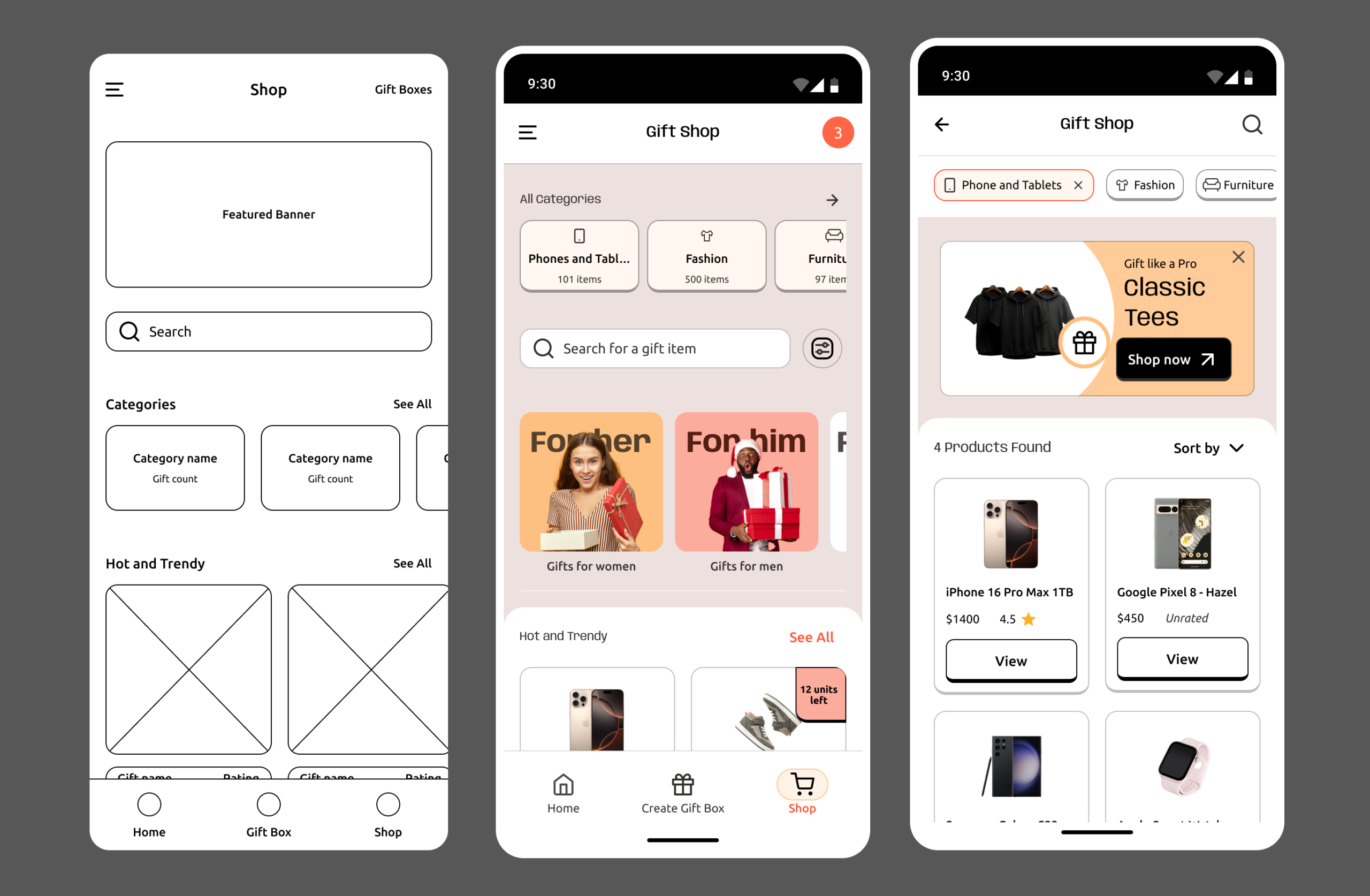
The first wireframes were functional but bland. Just a simple grid of products with an “Add to Gift Box” button. I mean, it worked (I think)…but it didn’t feel quite there yet. So, we refined it and added some features:
• Curated collections – Instead of long list of products, we grouped gifts into sections with titles that users could instantly recognize.
• One-tap adding – Users could add an item to a gift box with a single click, and a subtle animation confirmed this action.
• Smart filters and search – A predictive search bar where users could filter by gift type, occasion, interest, and price range to make finding the right gift easier.
Side-by-side shot of Shop page wireframe and refined mockups showing search and filtering features.
The “Aha!” Moment: When Users Fell in Love with the Shop Page
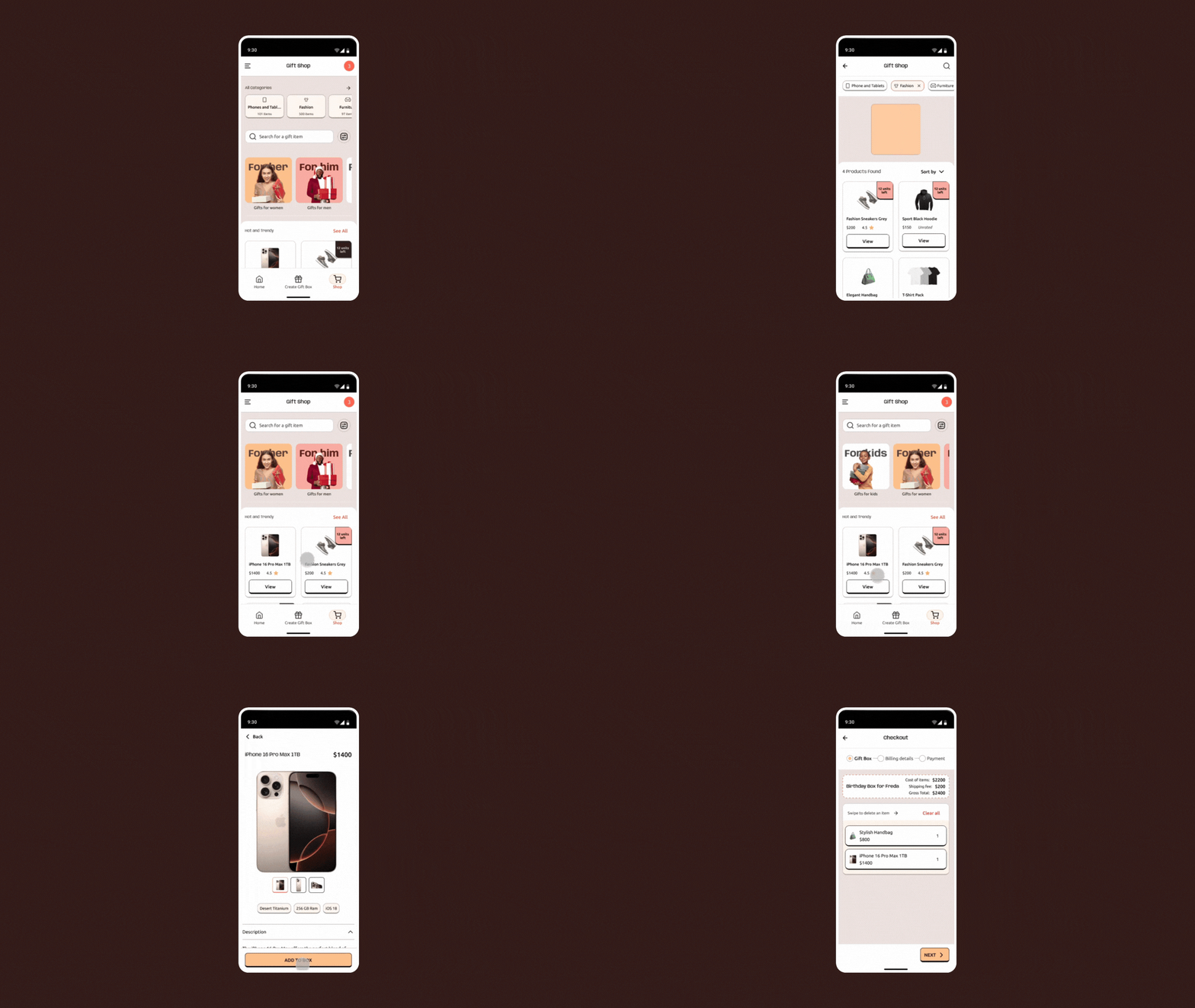
The first time we tested the new shop page, something interesting happened. Users who previously felt lost during testing, knew exactly where to go. They browsed with confidence, clicking through categories and filling their gift boxes quickly.
The shop page turned out to be more than just a part of the product, it was THE GAME-CHANGER. It improved the way users shopped for gifts and made it as simple as drinking a cup of water.
Interactive Prototype showing early refined version of the shop page with filtering features and how a user flows from the shop page to gift box building, and afterwards, checkout.
Phase 5: Delivery that Feels Like Magic
Delivery was where things got tricky.
Competitive analysis of similar e-commerce products revealed that traditional package tracking was often boring and had zero personalization; just a series of unclear updates like Package is on its way. That wasn’t good enough for the user.
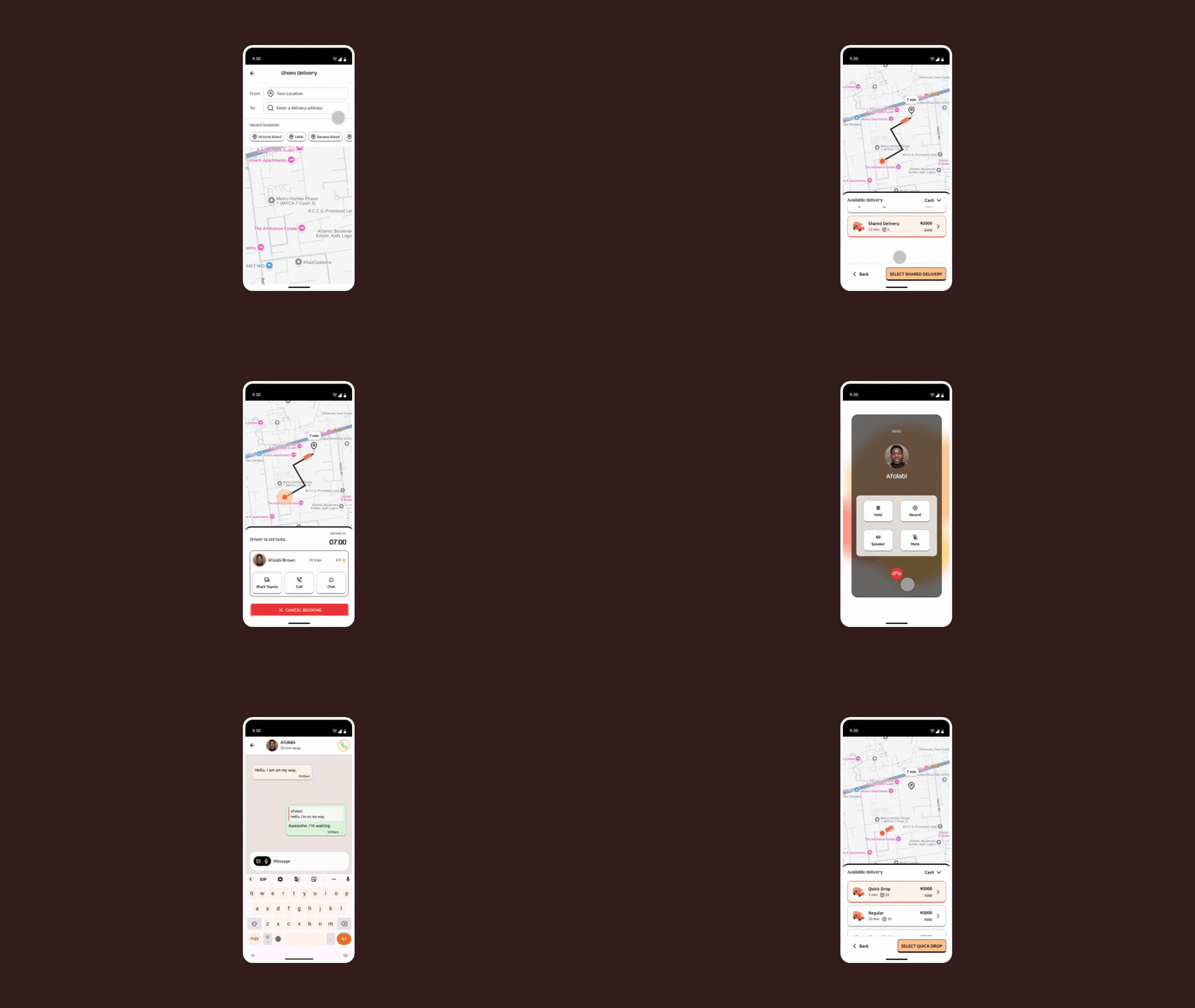
I pictured something sweeter: real-time driver tracking on a map, push notifications for important updates, and an Uber-like design that matched users with available drivers near them.
To make this work, I collaborated closely with developers to optimize the route-matching algorithm and integrate a simple and enjoyable user and driver interface.
The result? A delivery experience that felt personal and reliable. Users could see exactly where their package was and communicate with drivers if needed.
Small details, Big impact…
Throughout the design process, I focused on little moments that made a big difference:
Map and Navigation: A sleek, easy-to-use interface that helped users and drivers find the best routes.
Chat and Notifications: Real-time communication between users and delivery drivers, reducing anxiety around delivery status.
Interactive Prototype showing Uber-like interface and flow that matched users with available drivers near them.
Phase 6: An AI-powered Assistant for the Perfect Suggestions
In the middle of user testing, something new happened. One of our test users, a cool guy named Josh, hit a wall.
He was staring at the gift customization screen, totally lost. “I’m terrible at picking gifts,” he said. “If there was a magic stuff here that could just tell me what to get, it would really help.”
That was the spark we needed.
What if we could give users a smart assistant that would help them choose the perfect gift?
This led us to creating an AI-powered gifting feature.
Building the AI-powered Gift Assistant
We brainstormed an experience where users could ask questions like:
What’s a good gift for someone who loves art? What should I get for my dad’s birthday? You know, requests of that sort.
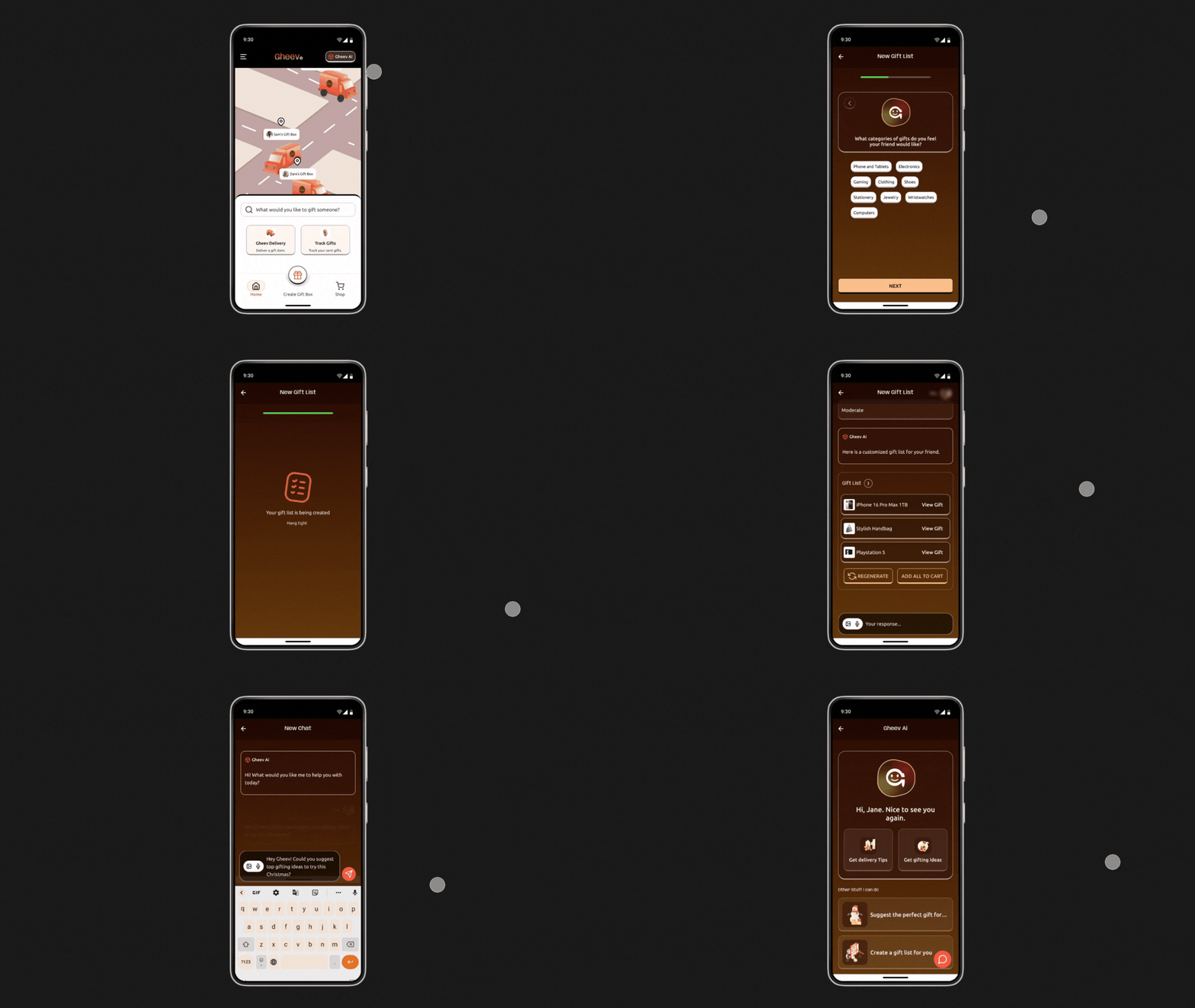
The AI would respond with thoughtful, creative suggestions, complete with links to items available on the app. But we didn’t stop there.
We added a personality-driven feature where users could answer a few fun questions about the gift recipient’s interests and peculiarity.
Based on their responses, the AI would generate a customized gift list, complete with ideas tailored to the recipient’s personality.
THE TAKEAWAY LESSONS
Learning and Reflections
What I learned
Designing the Gheev app experience was a journey filled with both wins and challenges which presented new creative opportunities for me. Here are some important things I learned:
Start with stories, not assumptions: Real conversations with users shaped the heart of the design. Hearing their struggles firsthand allowed us to empathize and prioritize meaningful solutions.
Balance AI intelligence with human warmth: User satisfaction skyrocketed when the when the experience moved beyond generic gift search to incorporating an AI assistant that felt thoughtful, creative, and very human-like.
Iterate, Iterate, Iterate: From early design sketches to multiple user testing, every iteration revealed new insights and opportunities to refine the experience.
Details matter: Small moments of delight, like confetti animations during checkout or playful prompts from the AI, created memorable experiences that users loved.
Design for emotions, not just efficiency: This wasn’t just about designing an app it was about designing a feeling, and we succeeded.
WHERE DO WE GO FROM HERE?
Next Steps
Train the Gheev AI to Be Thoughtful
After the initial excitement of the AI Assistant feature, the hard part was figuring out a way to train the AI to truly understand gifting, user personality, and questions with subtle nuances.
One of the next steps for this product, is training the AI assistant during the building stage, to connect the dots between user interests and gift ideas without making wild guesses.
Extending Gift Types and Categories
The early versions of the Gheev Product design exploration focused solely on physical products.
A next step would be extending gift types from just physical products in physical gift boxes to virtual gifts like gift cards, coupons, subscriptions, downloadable materials that can be accessed by the recipient from anywhere in the world.